Jan 24, 2026
🤖 AI Up-Skilling Journey | Here We Go Transfers App
AI
Building "Here We Go Transfers" - A Vibe Coding Journey Through Football's Transfer Window
How AI-powered development tools helped transform a soccer fan's frustration into a fully functional web app—without being a software engineer.
🔗 Visit Here We Go Transfers
The Problem: Too Much Noise, Not Enough Signal
If you follow football (soccer for my North American friends), you know the mid-season transfer window is exhilarating chaos. Players moving between clubs, last-minute deals, surprise signings—it's the drama we live for. And nobody covers it better than Fabrizio Romano, the undisputed king of transfer news, with his iconic "Here We Go!" confirmation tweets.
But here's the thing: I love the information, not the endless scrolling. Between Fabrizio's prolific posting, multiple news outlets, team announcements, and speculation, keeping track of actual confirmed transfers feels like a full-time job. I wanted answers to simple questions: Who moved today? Which teams are most active? What are the biggest deals this window?
The realization: What if I could consolidate all transfers in one place, with the analytics and insights I actually care about?
The Challenge: Mission 4 of the AI Daily Brief 10-Mission Program
This project emerged from Mission 4 of the AI Daily Brief's New Year Challenge: Transform Data into Insights Using AI. The mission challenged participants to collect real-world data and use AI to extract meaningful patterns and visualizations.
As someone who's passionate about football but not a professional software engineer, this felt like the perfect opportunity to test how far modern AI development tools could take me. Could I build a production-ready web application in under a week, working just 1-2 hours per day?
Spoiler alert: Yes. And here's how.
The Solution: Here We Go Transfers
Here We Go Transfers is a one-stop transfer tracking platform that delivers exactly what fans need during transfer windows:
Core Features
Real-time Transfer Data: Automated scraping from Transfermarkt.com, updating twice daily
Live Insider Feed: Embedded timeline from Fabrizio Romano's X account
Transfer Analytics Dashboard:KPI cards showing today's activity, window totals, and spending recordsDaily activity trends and league-by-league breakdownsTop transfers by value and latest confirmed deals
Comprehensive Transfer Table: Searchable, sortable, filterable database of all confirmed transfers
Mobile-First Design: Optimized experience across all devices
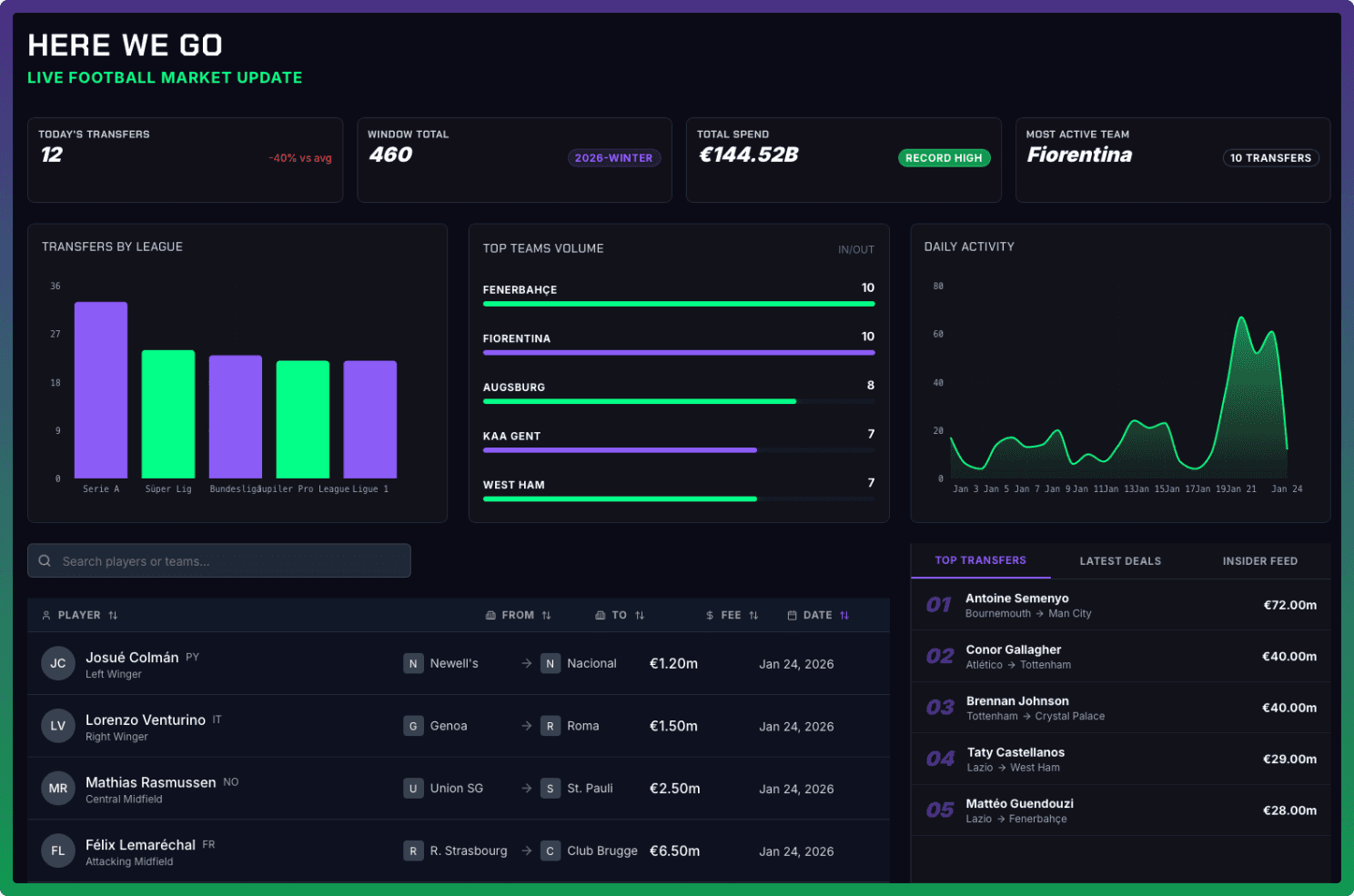
The Here We Go Transfers App
The Tech Stack
Built entirely using modern, AI-friendly tools:
Development: Windsurf (AI-powered IDE)
Frontend: Next.js 14+ with React, TypeScript, and Tailwind CSS
Backend: Supabase (PostgreSQL database)
Deployment: Vercel with automated cron jobs
Project Management: Linear (with MCP integration)
Version Control: GitHub
Design: Stitch by Google for mockups and prototyping
Data Sources: Transfermarkt.com scraping + X timeline embeds
The Journey: Six Key Challenges (and How I Overcame Them)
1. When Your AI Tools Stop Talking to Each Other
⚠️ The Problem: Linear's MCP (Model Context Protocol) integration with Windsurf would randomly stopped working. My entire workflow relied on AI reading Linear issues for planning, implementation tracking, and execution updates.
🧠 The Learning: AI tools are powerful but still evolving. When critical integrations fail, you need backup workflows. I pivoted to using Linear as a reference tool rather than the primary source of truth, maintaining manual documentation alongside ticket tracking.
2. The Ticket-Driven Development Trap
⚠️The Problem: Following a strict ticket-driven approach sounded professional, but it led me down rabbit holes. I'd spend hours implementing features that didn't align with the actual user experience I envisioned.
🧠 The Pivot: I switched to mockup-first development. Using Stitch AI, I created visual prototypes of what I wanted, then worked backward to determine implementation priorities. This prototype-driven approach proved far more effective for solo vibe coding projects.
3. The API That Wasn't There
⚠️The Problem: My original plan relied on consuming a transfer API. Unfortunately, every decent API either cost hundreds of dollars per month or had severe rate limitations—dealbreakers for a personal project.
🧠 The Pivot: I built a custom web scraper for Transfermarkt.com using Cheerio and TypeScript. The scraper:
Runs twice daily via Vercel cron jobs (11:30 AM/PM Eastern)
Uses macOS launchd agents for local development
Processes paginated results (250 transfers per run)
Directly seeds the Supabase database
🤯 The Challenge Within the Challenge: Now I needed scheduled automation. For production, Vercel's cron jobs handle it beautifully. For local development, I learned the hard way that macOS cron is unreliable—I had to migrate to launchd agents for consistent local execution.
4. The Inconsistent Data Nightmare
⚠️The Problem: My ticket-driven approach led to building features in isolation. KPI cards updated using one data flow, charts used another. The result? Dashboard components showing contradictory information for the same time period.
🧠 The Lesson: In rapid development, architectural consistency matters more than feature velocity. Build the foundation right, then build fast.
5. The X Timeline Embed That Doesn't Exist Anymore
⚠️The Problem: I spent an hour trying to implement X's (formerly Twitter) official timeline embed, following their documentation to the letter. Nothing worked. Rate limit errors (429), broken widgets, silent failures.
🧠 The Solution: I found Elfsight, a third-party widget provider that acts as a proxy for social media embeds. Within 30 minutes, I had a working, auto-refreshing timeline of Fabrizio Romano's latest tweets embedded in my sidebar.
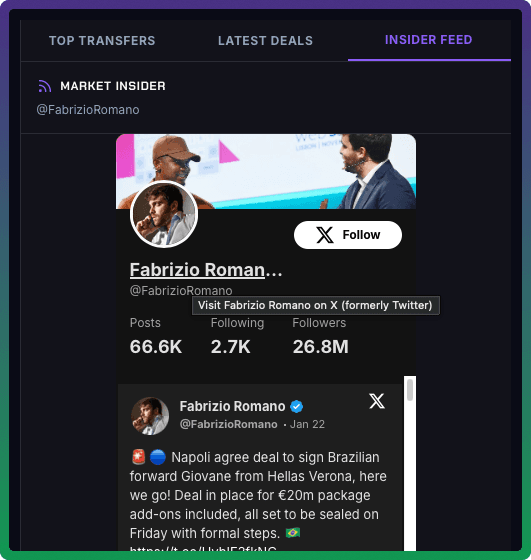
Fabrizio's X feed thanks for Elfsight
6. "This Looks Great on Desktop, But..."
⚠️The Problem: After sharing with friends (who are arguably even more passionate about football than I am), I realized they were using it primarily on mobile. While I'd implemented responsive design, I hadn't optimized the mobile user experience.
The Reality Check: Real estate on mobile is scarce, like housing in Toronto. Desktop patterns don't translate directly.
❤️🩹 The Fixes:
Converted tables to card-based layouts on mobile
Added horizontal scrollable carousels for KPI cards and charts
Implemented a mobile-specific sorting dropdown (desktop has column headers)
Added transfer date display to mobile cards (was missing in initial version)
Optimized touch targets and gesture controls
🧠 The Lesson: Responsive design ≠ Mobile-first experience. Test on real devices with real users early and often.
The Vibe Coding Patterns I Discovered
Pattern 1: Mockup-First, Code-Second
Pattern 2: Prototype in Public
Pattern 3: Constraints Breed Creativity
Pattern 4: AI is Your Junior Developer, Not Your Architect
The Takeaway: Just Start Building
There's still more I'd like to improve on the app to really feel proud about it. That said, it's impressive that I was able to get to where it is in less than a week's time, dedicating an average of 1-2 hours per day, not being a SW engineer, not knowing the best vibe coding patterns, and using primarily old models to reduce cost.
If you're reading this and thinking "I could never build something like that," I want to challenge that assumption. A couple of months ago, I would have thought the same thing.
What changed? Not my programming ability. What changed was the tooling. AI-powered development tools like Windsurf, paired with modern platforms like Vercel and Supabase, have lowered the barrier to entry for bringing ideas to life.
What will you build with AI super powers? Let me know in the comments—I'd love to hear your ideas and learn from your experiences.
P.S. — If you're a Fabrizio Romano fan, you'll appreciate the app name. And if you're not... well, Here We Go! 🚀⚽
#VibeCoding #AIDaily Brief #BuildInPublic #Football #TransferWindow #AIForDevelopers #NextJS #ProductDevelopment #NoCode #LowCode